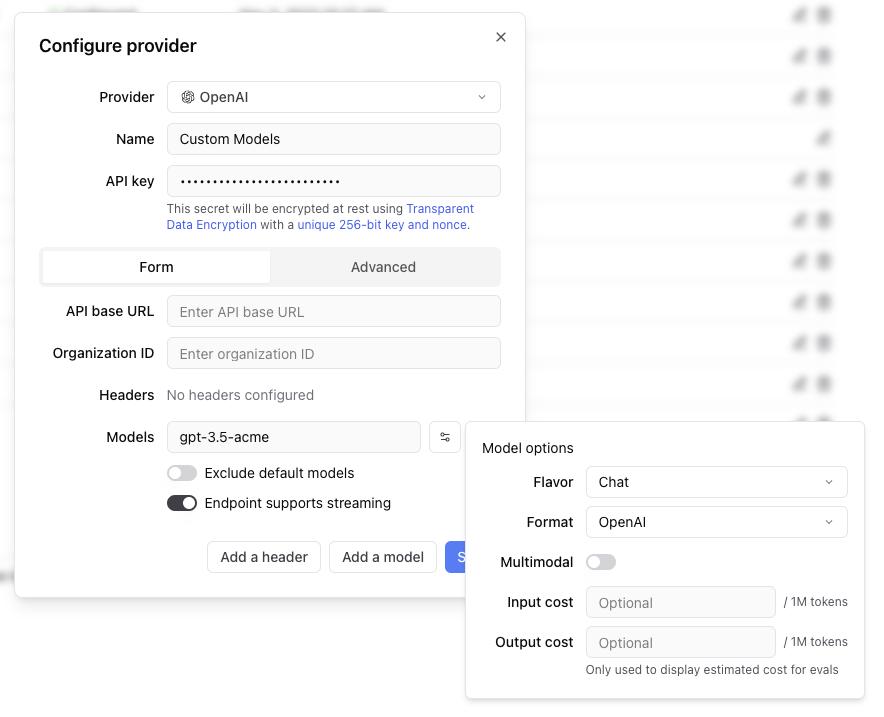
 Any headers you add to the configuration will be passed through in the request to the custom endpoint.
The values of the headers can also be templated using Mustache syntax.
Currently, the supported template variables are `{{email}}` and `{{model}}`.
which will be replaced with the email of the user whom the Braintrust API key belongs to and the model name, respectively.
If the endpoint is non-streaming, set the `Endpoint supports streaming` flag to false. The proxy will
convert the response to streaming format, allowing the models to work in the playground.
Each custom model must have a flavor (`chat` or `completion`) and format (`openai`, `anthropic`, `google`, `window` or `js`). Additionally, they can
optionally have a boolean flag if the model is multimodal and an input cost and output cost, which will only be used to calculate and display estimated
prices for experiment runs.
#### Specifying an org
If you are part of multiple organizations, you can specify which organization to use by passing the `x-bt-org-name`
header in the SDK:
Any headers you add to the configuration will be passed through in the request to the custom endpoint.
The values of the headers can also be templated using Mustache syntax.
Currently, the supported template variables are `{{email}}` and `{{model}}`.
which will be replaced with the email of the user whom the Braintrust API key belongs to and the model name, respectively.
If the endpoint is non-streaming, set the `Endpoint supports streaming` flag to false. The proxy will
convert the response to streaming format, allowing the models to work in the playground.
Each custom model must have a flavor (`chat` or `completion`) and format (`openai`, `anthropic`, `google`, `window` or `js`). Additionally, they can
optionally have a boolean flag if the model is multimodal and an input cost and output cost, which will only be used to calculate and display estimated
prices for experiment runs.
#### Specifying an org
If you are part of multiple organizations, you can specify which organization to use by passing the `x-bt-org-name`
header in the SDK:
### Iterative experimentation
Rapidly prototype with different prompts
and models in the [playground](/docs/guides/playground)
and models in the [playground](/docs/guides/playground)
### Performance insights
Built-in tools to [evaluate](/docs/guides/evals) how models and prompts are performing in production, and dig into specific examples
### Real-time monitoring
[Log](/docs/guides/logging), monitor, and take action on real-world interactions with robust and flexible monitoring
### Data management
[Manage](/docs/guides/datasets) and [review](/docs/guides/human-review) data to store and version
your test sets centrally
your test sets centrally
Reset Password
```
Reset Password
```

John Doe
Lorem ipsum dolor sit amet, consectetur adipiscing elit. Nulla ut turpis
hendrerit, ullamcorper velit in, iaculis arcu.
500
Followers
250
Following
1000
Posts
```